
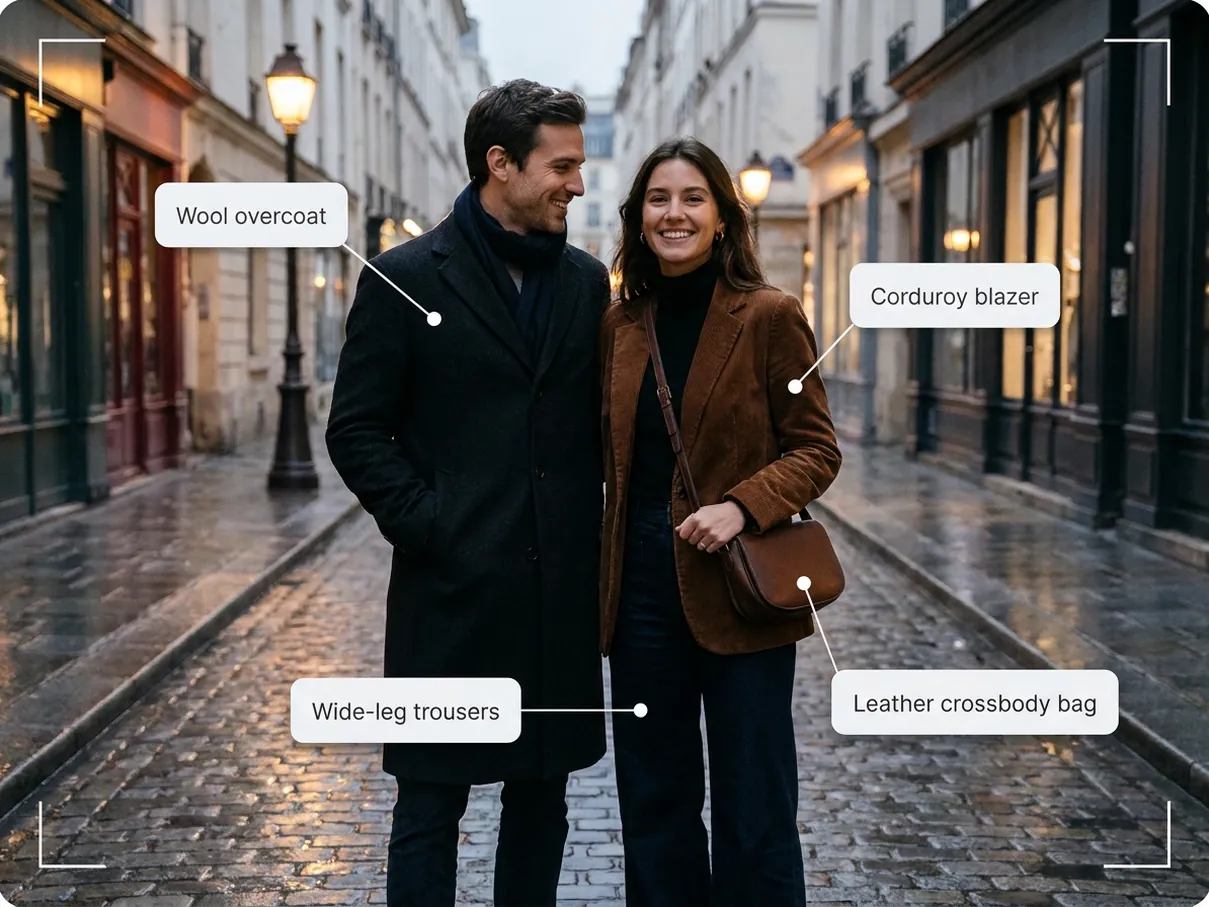
What an AI outfit finder does with your photo
Two layers of software do the work. Computer vision finds the garments in the picture and reads colors, patterns, shapes, logos and the region each item occupies. A multimodal model then connects that picture to text, product catalogs and web search results, so a gray wool coat in a street photo becomes a query a store database can answer.
Google Lens, Amazon StyleSnap, Fashwell and Lykdat are documented examples of image-based clothing search. They share a basic idea but not a job. Some search the open web, some search one retailer, and a few only describe what they see.
The phrase also covers a second group of tools that start from your closet instead of a photo of a stranger. These suggest outfits, plan the week, or render a try-on image. We cover that side further down, because it solves a different problem.
Exact piece or close match: what a result really tells you
Expect one of two outcomes. Either the tool finds the product itself, or it finds items that look like it. Exact identification needs a searchable catalog or an indexed web page that contains the same piece. When that page does not exist, you get a lookalike, and the lookalike can be perfectly good.
Visual similarity does not prove the brand, the model, the size, the material, whether the item is authentic, or whether it is still on sale. A black jacket that matches yours stitch for stitch in a photo may still come from another label, in another fabric. Open the product page and compare before accepting any result.
No consumer tool in this space publishes a verified accuracy figure that we can quote, so be wary of any app promising a percentage. Plan on checking the answer yourself.
A practical rule helps here. Call a result "similar" until the product name, material and visible details all agree with your photo. Only then call it "the one". That small habit prevents most returns, and it keeps you honest when a sponsored listing sits at the top of the page looking very sure of itself.
How to take or choose a photo that can be identified
The picture matters more than the tool. A few habits cover most failures.
- Let one garment fill a large, clear part of the frame. A crop of the boots beats a full-body shot where the boots are a gray smudge.
- Use daylight or even indoor light and keep the image sharp. Camera color shifts and filters change how a navy sweater reads.
- Pick a front or side view. A heavily blocked view, with an arm across a bag or a scarf over the collar, removes the details a search needs.
- Look for signals that point to a product: a visible logo, a label, hardware, a distinctive stitch pattern, a sole shape, an unusual trim.
- Use a product photo or a screenshot on a plain background when you can. They are usually easier to match than a crowded sidewalk.
- Add a second angle if two products look alike. A side view of a sneaker often separates it from its near twin.
With just one messy photo, the scanner above is the quickest place to begin. Its description, plus how sure it is, is often enough to write a better search phrase such as "men's tan suede chukka boot, crepe sole".
Which kind of tool fits which job
These are the reported 2026 details for the tools people mention most. Prices and free limits shift by country, platform and tax, and the figures below were reported in October and November 2026, so confirm them on the vendor's own site.
| Job | Tool | What was reported |
|---|---|---|
| Search the whole web by image | Google Lens | Returns exact-product clues, retailer pages, prices and visually similar clothing. No separate charge appears in the cited sources. |
| Match inside one store | Amazon StyleSnap | Identifies or matches clothing from an uploaded image within the shopping feature. |
| Fashion-specific matching | Fashwell, Lykdat | Reported as clothing-matching services. |
| Digital closet and outfit advice | Acloset | Free up to 100 items, with plans reported from $3.99 a month. |
| Digital closet and outfit advice | Whering | Free use, with optional purchases such as a reported $4.99 Outfit Maker. |
| Digital closet and outfit advice | Fits | Free closet, Fits Pro at $9.99, $29.99 or $59.99, AI credits from $1.99 for five. |
| Digital closet and outfit advice | Style DNA, Alta Daily | Style DNA from $7.99 a month on iPhone. Alta Daily reported as free with no in-app purchases. |
| Virtual try-on | The New Black, FitRoom | The New Black from $15 a month with free signup credits. FitRoom reported at $4.99 weekly or $29.99 to $39.99 yearly. |
| Human styling | Indyx | Reported at $12.99 a month, with human stylist services from $60. |
The pattern is easy to see once the table is in front of you. Search tools find products. Closet apps plan outfits. Try-on tools produce pictures. Pick the row that matches your question and ignore the rest.
Finding one piece, category by category
Each garment type has its own tells, its own lookalikes and its own search phrases. The pages below go into the details for each.
Shoes
Sneakers and boots are the easiest pieces to lose in a photo and among the hardest to name from one angle. Toe shape, panel layout, outsole profile and the tongue label do the identifying. Naming the shoes in a photo starts with how to shoot them and which words to search.
Dresses
Three pages split the dress problem by what you have in hand. If you saw one on someone and want the maker, start with identifying a dress from a picture. If you have a screenshot and want to buy it, tracking down the exact dress shows how to work through retailer pages. Sold out or priced out of reach? Then finding similar dresses at other stores is the realistic route.
Tops, shirts and knitwear
Necklines, collars, cuffs and fabric weight separate tops that look identical in a thumbnail. Use finding a top from a photo for blouses, tees and knits, then tracking down a particular shirt for button-ups. When you only need the name of the style, what kind of shirt this is explains Oxford, dress, camp collar and the rest.
Jackets and trousers
A blazer and a structured jacket can look the same from the front, and wide-leg trousers can pass for flares at a bad angle. Identifying a jacket by its details looks at lapels, lining and closures. Working out which pants you are looking at compares hem width, rise and cut, for both menswear and womenswear.
Bags, hats, glasses and jewelry
Accessories carry the most recognizable hardware, which helps, and the most counterfeits, which does not. Use naming a handbag from a photo for handles, straps and buckles. Telling one hat style from another sorts bucket hats from beanies and flat caps. Finding the frames in a photo works through lens shape and bridge. For chains and pendants, identifying a necklace from an image covers links, clasps and stones.
Brand names, labels and cheaper alternatives
When a piece has a logo, a label or distinctive hardware, you can often go straight to a brand. Working out the brand behind a garment shows what to look for on tags, soles and stitching, and why a logo alone does not authenticate anything. For high-value items, ask for provenance and use an independent expert to check it.
Plenty of people are not after the original at all. They want the same silhouette at a lower price. A dupe finder for budget lookalikes helps you judge what a good copy keeps, such as proportions and color, and what it drops, such as fabric quality.
From a single item to a full look and a wardrobe plan
A photo of one outfit raises a bigger question than one piece. You may want every item in it, or you may want to know what to wear next. We split that into separate pages.
- To buy a complete look piece by piece, read about how to shop the look from a photo.
- To build new outfits around something you already own, try an outfit generator that starts from one piece.
- To get a second opinion before you leave the house, an outfit checker for quick feedback reviews fit, color and balance.
- To see how human and software styling compare, read about an AI stylist for personal advice.
- To decide on a morning when nothing seems right, deciding what to wear today works from weather and occasion.
Closet apps sit behind many of these jobs. They catalog your clothes from photos, then suggest combinations. If you want a human instead, Indyx reports stylist services from $60 on top of a $12.99 monthly plan. Software is cheaper and instant. A person can judge proportion, color and occasion in a way a recommendation list rarely does.
Turning a first result into a purchase
A name or a lookalike is the start. The order below keeps you from paying for the wrong thing.
- Crop the photo to one piece at a time: top, bottom, shoes, bag. Keep a separate full-outfit image so you remember how the pieces were worn together.
- Run the crop through an image search, then add plain words to the query, such as color, material, cut, "men's" or "women's", and any brand you can read.
- Search the text around the picture on its own. A caption, a creator's tag or a visible product code often finds the page faster than the image does.
- Line up the candidates and compare construction: logo placement, hardware, seams, sole, proportions. Color alone misleads.
- Open the retailer's current page and read the product name, material, measurements, size chart, stock, shipping and return terms.
- If the piece is sold out or discontinued, try resale sites before you settle for a lookalike.
- Screenshot the listing, price and seller, because listings change or vanish.
This is the stage where most people save money. Two jackets that look alike in thumbnails can differ in lining, closure and cut, and those differences show up in how the garment hangs on you.
Searching for menswear and womenswear in the same way
The method does not change with the wardrobe, but the vocabulary does. A menswear photo might hold an overshirt, chinos and suede boots. A womenswear one might hold a wrap dress, a structured tote and block-heel sandals. Name the cut in each case. Words like slim, tapered, cropped, longline, oversized and relaxed narrow the field quickly.
Sizing conventions differ between men's and women's ranges, and between regions, so a result that looks right can still run a full size off. Check the size chart on the actual listing and compare it with a garment you own that fits well.
Where AI clothing identification goes wrong
Know the failure modes before you trust an answer. We keep them in one place so you can check each against your own photo.
- The system may return a garment category, or a similar item, instead of the product you photographed.
- Black, white, reflective, transparent, patterned, layered, loose or partly hidden garments are harder to classify.
- Logos and labels can be missed, misread or invented by the model.
- Lighting, camera color, pose, cropping, compression, filters and background clutter all change the result.
- Recommendations may reflect which products are in a catalog, or which ones are promoted, instead of which item is better or suits you.
- Prices, stock, sizes, sellers and product pages change. Check the retailer's current listing for the live price.
When something looks off, upload a cleaner crop to the scanner and compare the confidence level against what you can read on a tag. A photo also cannot reliably tell you a person's identity, income, personality or health from what they wear, so do not read results that way.
Why a try-on image is not a fitting room
Virtual try-on tools such as FitRoom and The New Black, or Google's shopping try-on, draw a garment onto a picture of you. The pictures are fun and sometimes useful for color. Edits may also alter the cut of the body, how the garment is built, its color and its small details, which makes them poor proof of how something will fit. Order from a retailer with a clear size chart and returns, and use the image as a mood board.
Keeping your photos private
Outfit photos carry more than clothes. Faces, children, home interiors, body images and location clues often sit in the frame. The sources we reviewed do not show uniform retention, deletion, encryption or training policies across these apps, so assume nothing.
Crop to the garment first. Skip intimate or identifying images unless the service states how long it keeps files, who it shares them with and how you can delete them. Read the privacy policy of any app that asks for your photos, and prefer the ones that say plainly what they do.
What people ask about outfit finders
Can AI really identify clothes from a photo?
It can recognize the type of garment, the color, the pattern, the silhouette and visible logos or labels, and it can often find similar products. Finding the exact product depends on that product being indexed online. Black, patterned, layered or partly hidden clothes are harder, and the result can be a lookalike. Confirm every answer on the retailer page.
How do I find clothes from a picture for free?
Start with a free general image search such as Google Lens, which returns retailer pages, prices and similar clothing, and check whether your retailer offers its own photo search. Crop the item first, add words like color, cut and men's or women's, then compare the listings. Some closet apps also have free tiers, though those organize outfits instead of searching shops.
Why does the search show similar clothes instead of my exact item?
Visual search matches shapes, colors and patterns against what it has indexed. If the exact product page is not in a catalog, or the photo hides the label and hardware, the best the tool can offer is a similar item. A sharper crop, a second angle and a search on any visible logo or caption raise your chances.
What kind of photo works best for finding an outfit?
A sharp image in even light where one garment fills a big part of the frame, shot from the front or side. A product photo or screenshot on a plain background beats a busy street scene. Visible logos, labels, buckles, stitching and sole shapes all help. Take several angles when two products look alike.
Can a photo tell me the size, fabric or whether an item is authentic?
No. A photo shows how a fabric looks, not its fiber content, and it cannot give exact measurements without a reference scale. A logo alone does not prove a piece is real. For size, material and authenticity, rely on the retailer's product details, a label, provenance and, for luxury goods, an expert.
Are AI virtual try-on images accurate for fit?
Not reliably. Generated try-on images can alter body shape, garment construction, color and detail, so they are poor evidence of how something will fit. They help you picture a color or a style. Use the retailer's size chart and measurements to choose a size, and check the return terms.
Is it safe to share my outfit photos with a clothing finder?
The answer changes with the service. Photos can show faces, children, home interiors and location clues, and policies on storage, sharing, training and deletion vary by app. Crop out faces and anything identifying, avoid intimate pictures, and read the privacy policy first. Use only services that clearly explain retention and offer a way to delete your images.
Does an outfit finder work for menswear as well as womenswear?
Yes. The tools read garment shape, fabric look and details, not gender, so a chino, an overshirt or a leather boot is found the same way as a dress or a skirt. Add words such as men's or women's to your search to narrow the cut and sizing, since fit conventions differ between the two.